Quadshaper
The Quadshaper - NextGen Multiband Distortion Plugin
Upgrade Your Sound Design Today With Our Outstanding Multi-Effect Plugin
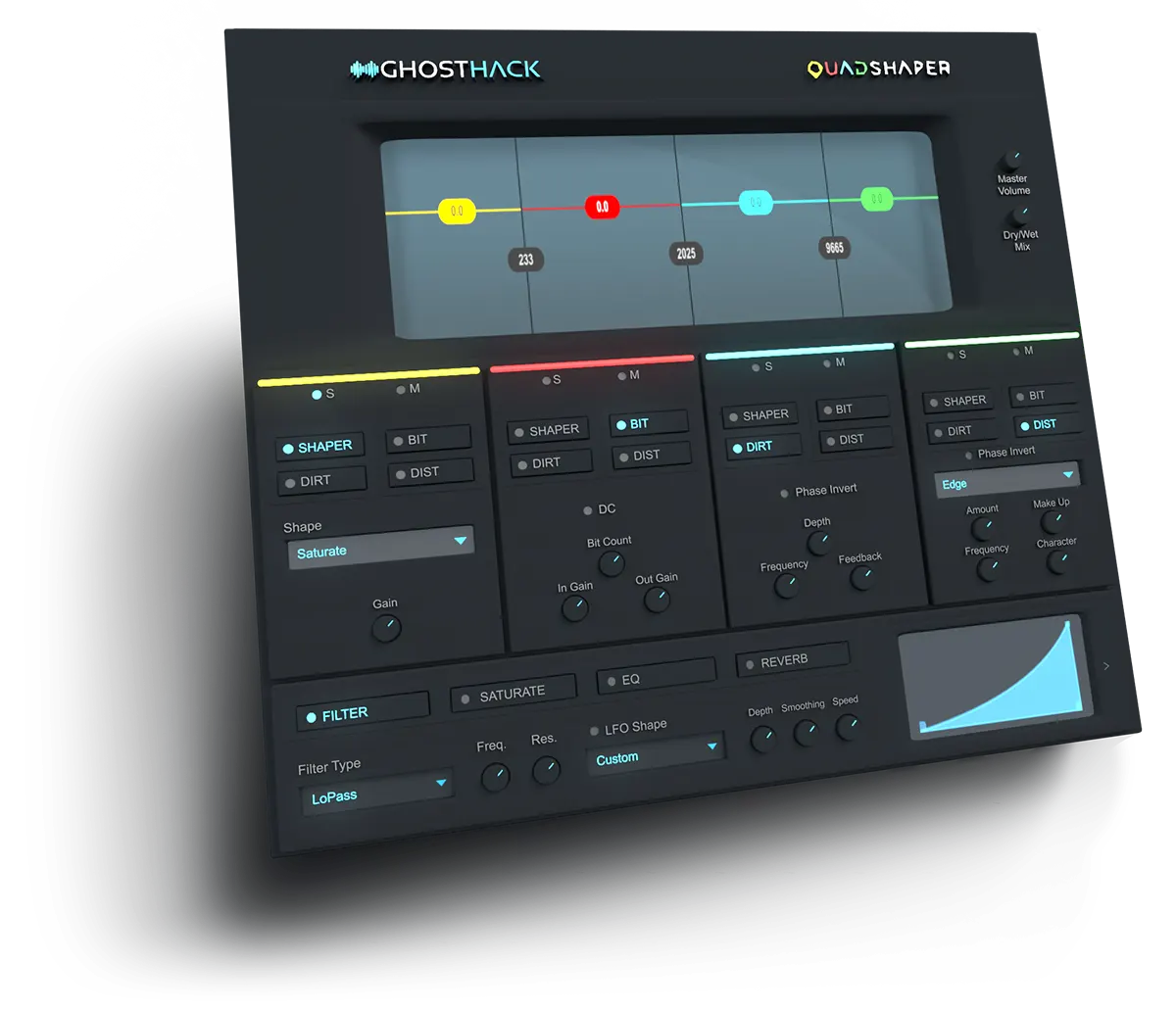
- Includes 4 Multiband Waveshaper
- 4 Distortion Modules
- 4 Additional Master Effects
- VST3 Plugin
- Works on MAC and Windows
- Instant Download After Purchase
- Lifetime Updates
- Free Demo Version Available
- 30 Day Money-Back Guarantee
VST3 Plugin: Compatible With Many DAWs

Ghosthack Audio's First Plugin is Here!
We proudly present our first effect plugin: The Quadshaper, a multiband distortion VST3 plugin with 4 additional master effects.
We invite you to get your hands on this brand new plugin today and be one of the first who will try the Quadshaper.
Manipulate your sound with 4 different distortion modules for each band: Shaper, bitcrusher, DIRT and distortion. All modules can be combined within each band.
On top, the Quadshaper comes with 4 versatile mastering effects to shape your individual sound even further: Filter, saturation, EQ and reverb.
The Quadshaper is the perfect tool for subtle saturation or crazy heavy distortion for all kinds of samples: May it be your drums or your bassline, this plugin will level up your sound design.
The Multiband Window
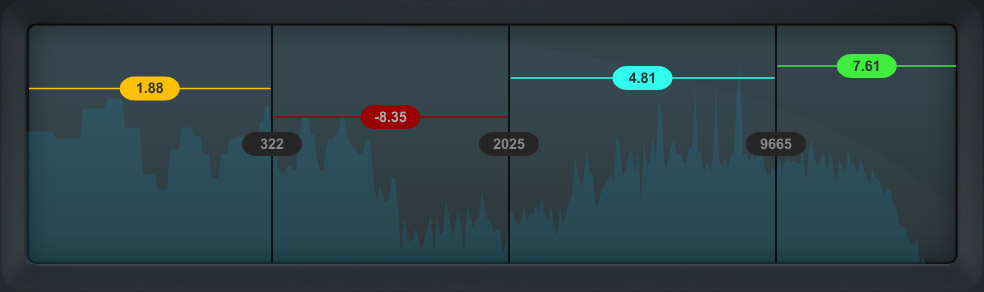
Apply Distortion Individually to Different Frequency Windows
The multiband window is divided into four frequency bands. You can adjust the gain of each band providing a simple shelf EQ functionality.
With the four color coded bands you are able to apply the distortion effects to each one of the bands separately.
The output signal's spectrum is displayed in the background of the window to help guide you where to place each band. If you want to edit the bands, you can simply drag and drop the vertical dividers or even reduce your bands to just one by pulling all dividers to the side. Then you can apply the distortion effects to the whole input signal.
Each of the four bands can be effected using the following distortion modules.
Distortion Effects
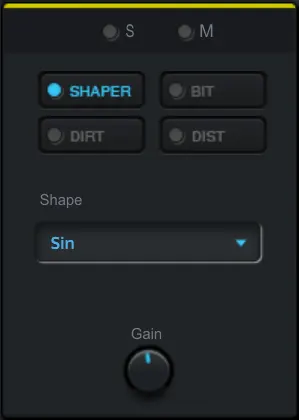
Shaper
This is a waveshaper that uses waveforms in order to shape the sound.
You can choose the appropriate waveform from the drop-down menu: TanH, Sin, Saturate, Square, SquareRoot, Curve.
Adjust the power of this effect via the gain knob.
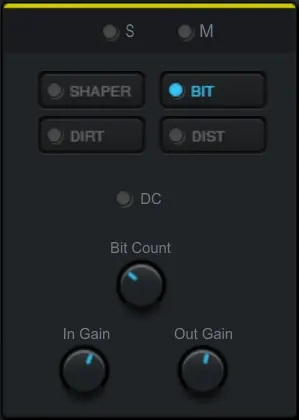
Bitcrusher
The BIT is a unique effect that lowers the aliasing of the sound to a much lesser value than its source, resulting in an incredibly lofi sound.
The DC switch can be enabled to offset the amplitude away from zero and will result in a much more aggressive version.
The BitCount lowers the bit depth down from 16 to 4 bits.
The „In Gain“ parameter controls the volume of the incoming signal, whereas „Out Gain“ controls the volume of the outgoing signal.
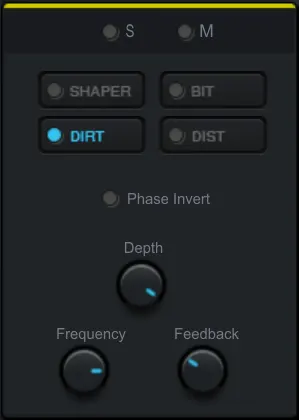
Dirt
Dirt has a smoother resonance and is very useful for a subtle flavor of distortion.
The depth parameter controls the amount of distortion.
The frequency knob controls the frequency peak of the distortion.
The feedback parameter controls the amount of the feedback sound.
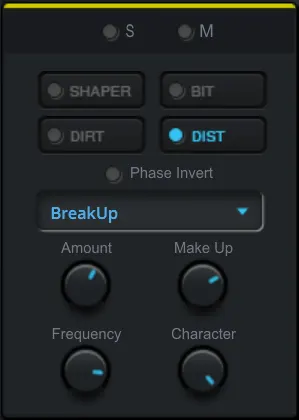
Distortion
The distortion module comes with a myriad of various algorithms that you can choose from the drop down menu.
Each option has its own flavor of distortion from basic guitar amps to really heavy sound destruction.
The amount knob controls the heaviness of the distortion.
The frequency parameter changes the frequency peak.
The make up changes the overall volume of the effect.
Character adds a subtle difference in harmonics.
Master Effects




Add a Final Filter, Saturation, EQ and Reverb Directly in the Plugin
After you widened the sound, gave it more power, crushed it down and distorted it, you have the option to add master effects that are applied at the end of the effect chain.
You can choose between Filter, Saturate, EQ and Reverb to fully manipulate the sound just inside this plugin. Each effect can be added individually by activating the toggle button. You can combine some effects or use them all at the same time.
The filter offers highpass, bandpass and lowpass which can be controlled in frequency and resonance. You have the option to automate it via an LFO shape. Its speed is automatically synced to your DAW's BPM but can also be adjusted via the speed dial.
When using saturate you can add harmonics to all bands in a final mix.
Further shape your sound with an individual curve based EQ. You can design the curve freely by adding, deleting and moving points with a simple mouse click.
The final step is to add reverb and create a feel of room to your sound. Control amount, width, size and damping of the reverb with a dial of a knob.



Login
Why Producers Love This Pack
3 January 2024 05:36
I love this plug in. Very useful.
Very powerful..the distortion sounds nice too. Guitars,vocals,bass gtr..snares,kicks,tops..can be useful for all.
Kyle T. Verified Buyer
31 May 2023 13:07
Quadshaper
Easy to install, Great effects control, Enhances the original sounds
William D. Verified Buyer
4 March 2025 07:23
Guter Plugin
arbeite gern mit dem Plugin. Viele Einstellmöglichkeiten. Einfach zu bedienen. Klare Kaufempfehlung.
Dietmar S. Verified Buyer
25 March 2026 17:21
Quadshaper vst
Excellent distortion plug in, very useful. Multi band with the solos are great for fine tuning. .
chris h. Verified Buyer
30 April 2023 12:25
Let's see how it goes !
Just starting to use it. Not so simple to configure at first, so I'll give it a good try before jumping to any conclusion. But 5 stars nonetheless because it's Ghosthack, you know. Just, make sure to keep it updated, guys ! Early Access is supposed to evolve. Love all your stuff so far ! Cya soon for another 5 stars rating !
Jun E. Verified Buyer
8 April 2023 21:32
Wery professional.
A rare VST to create that extra egde to your beat!
Tomas Ø. Verified Buyer
Frequently Asked Questions
The Quadshaper comes as a VST3 plugin and needs a DAW (Digital Audio Workstation) in order to work properly.
It works with all commonly known DAWs: FL Studio, Ableton, Cubase, Logic Pro, Studio One and so on.
The Quadshaper comes with an installer for MAC and Windows.
The download includes a PDF for all common DAWs.
Usually, you run the installer and scan your DAW for a new plugin.
The Quadshaper is tested and should run flawlessly on all systems and DAWs.
Nevertheless, as this is version 1.0.0, we can't promise that this version is 100% bug free.
If you encounter any bugs or problems please send us a mail via our contact form.
Your serial number is part of your Quadshaper order that you will find inside your account after signing in.
Do you still have questions? Check our FAQ section here!